| INTERRUPT Examples | Syntax |
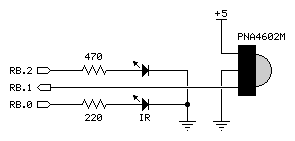
This example shows how to create an RTCC rollover interrupt to create the modulation frequency for an infrared LED.
' -------------------------------------------------------------------------
' Program Description
' -------------------------------------------------------------------------
'
' This program modules an IR LED using the interrupt handler to toggle the
' IR LED state at a rate of 38.5 kHz.  Since the program requires two
' changes of state at this rate, the ISR rate is doubled to 77,000.
'
' When an object reflects the IR from an the LED to the detector the Alarm
' LED will illuminate.

' -------------------------------------------------------------------------
' Device Settings
' -------------------------------------------------------------------------

DEVICE          SX28, OSCXT2, TURBO, STACKX, OPTIONX
FREQ            4_000_000
ID              "ISR LED"

' -------------------------------------------------------------------------
' IO Pins
' -------------------------------------------------------------------------

IrLed           VAR     RB.0                    ' IR LED control
Detect          VAR     RB.1                    ' detector input
Alarm           VAR     RB.2                    ' alarm LED output

' -------------------------------------------------------------------------
  INTERRUPT NOPRESERVE 77_000
' -------------------------------------------------------------------------

ISR_Start:
  IrLed = ~IrLed                                ' toggle IR LED
  RETURNINT

' =========================================================================
  PROGRAM Start
' =========================================================================

' -------------------------------------------------------------------------
' Program Code
' -------------------------------------------------------------------------

Start:
  LOW IrLed                                     ' make output, off
  LOW Alarm                                     ' make output, off

Main:
  Alarm = ~Detect                               ' check detector
  PAUSE 50
  GOTO Main
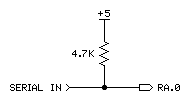
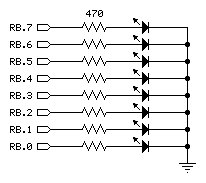
This example shows how to create an RTCC rollover interrupt to create a "background" serial receiver that runs up to 19.2 kBaud (with a 4 MHz clock), N81, true mode. A blinking LED indicates "foreground" activity while serial data is being received.
 |
 |
' -------------------------------------------------------------------------
' Program Description
' -------------------------------------------------------------------------
'
' This program demonstrates the construction of an ISR to receive serial
' data "in the background" using a 16-byte circular buffer.
'
' Note: Requires SX/B 1.2 or later

' -------------------------------------------------------------------------
' Device Settings
' -------------------------------------------------------------------------

DEVICE          SX28, OSCXT2, TURBO, STACKX, OPTIONX
FREQ            4_000_000
ID              "ISR UART"

' -------------------------------------------------------------------------
' IO Pins
' -------------------------------------------------------------------------

Sin             VAR     RA.0                    ' serial in
Blinker         VAR     RB.0                    ' blinking LED
LEDs            VAR     RC                      ' eight LEDs (7-segs)
TRIS_LEDs       VAR     TRIS_C

' -------------------------------------------------------------------------
' Constants
' -------------------------------------------------------------------------

B1200           CON     64                      ' 1200 Baud
B2400           CON     32                      ' 2400 Baud
B4800           CON     16                      ' 4800 Baud
B9600           CON     8                       ' 9600 Baud
B19K2           CON     4                       ' 19.2 kBaud (max @ 4 MHz)

BitTm           CON     B19K2                   ' samples per bit
BitTm15         CON     3*BitTm/2               ' 1.5 bits

' -------------------------------------------------------------------------
' Variables
' -------------------------------------------------------------------------

rxHead          VAR     Byte                    ' available slot
rxTail          VAR     Byte                    ' next byte to read
rxByte          VAR     Byte                    ' serial byte
rxCount         VAR     Byte                    ' bits to receive
rxTimer         VAR     Byte                    ' bit timer for ISR
rxBuf           VAR     Byte(16)                ' circular buffer

tmpB1           VAR     Byte                    ' parameter

' -------------------------------------------------------------------------
  INTERRUPT NOPRESERVE
' -------------------------------------------------------------------------

' ISR is setup to receive N81, true mode.

ISR_Start:
  ASM
    MOVB C, Sin                                 ' sample serial input
    TEST rxCount                                ' receiving now?
    JNZ RX_Bit                                  ' yes if rxCount > 0
    MOV W, #9                                   ' start + 8 bits
    SC                                          ' skip if no start bit
    MOV rxCount, W                              ' got start, load bit count
    MOV rxTimer, #BitTm15                       ' delay 1.5 bits

RX_Bit:
    DJNZ rxTimer, ISR_Exit                      ' update bit timer
    MOV rxTimer, #BitTm                         ' reload bit timer
    DEC rxCount                                 ' mark bit done
    SZ                                          ' if last bit, we're done
    RR rxByte                                   ' move bit into rxByte
    SZ                                          ' if not 0, get more bits
    JMP ISR_Exit

RX_Buffer:
    MOV FSR, #rxBuf                             ' get buffer address
    ADD FSR, rxHead                             ' point to head
    MOV IND, rxByte                             ' move rxByte to head
    INC rxHead                                  ' update head
    CLRB rxHead.4                               ' keep 0 - 15
  ENDASM

ISR_Exit:
  RETURNINT 52                                  ' 13 uS @ 4 MHz

' =========================================================================
  PROGRAM Start
' =========================================================================

' -------------------------------------------------------------------------
' Subroutine Declarations
' -------------------------------------------------------------------------

GET_BYTE        SUB     0                       ' returns byte from buffer

' -------------------------------------------------------------------------
' Program Code
' -------------------------------------------------------------------------

Start:
  TRIS_LEDs = %00000000                         ' make LED pins outputs
  OPTION = $88                                  ' interrupt, no prescaler

Main:
  IF rxHead <> rxTail THEN                      ' if buffer has data
    LEDs = GET_BYTE                             ' get byte from buffer
  ENDIF
  TOGGLE Blinker                                ' blink LED
  PAUSE 50                                      ' small pause
  GOTO Main

' -------------------------------------------------------------------------
' Subroutine Code
' -------------------------------------------------------------------------

' Use: aVar = GET_BYTE
' -- if data is in buffer, the next byte is move to 'aVar'
' -- if called when buffer empty, code waits for character to arrive

GET_BYTE:
  DO WHILE rxHead = rxTail
    ' wait while empty
  LOOP
  tmpB1 = rxBuf(rxTail)                       ' get first available
  INC rxTail                                  ' update tail position
  \ CLRB rxTail.4                             ' keep 0 - 15
  RETURN tmpB1
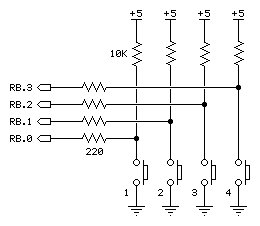
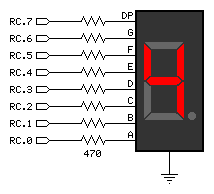
This example shows how to use a port B edge detection interrupt to determine which button was pressed first.
 |
 |
' -------------------------------------------------------------------------
' Program Description
' -------------------------------------------------------------------------
'
' On reset the 7-segment LED is cleared to a dash and the program waits
' for a button press (RB.0 - RB.3) -- the "winner" (first pressed) will
' be displayed on the display until reset.

' -------------------------------------------------------------------------
' Device Settings
' -------------------------------------------------------------------------

DEVICE          SX28, OSC4MHZ, TURBO, STACKX, OPTIONX
FREQ            4_000_000
ID              "ISRPORTB"

' -------------------------------------------------------------------------
' IO Pins
' -------------------------------------------------------------------------

Buttons         VAR     RB                      ' button inputs
TRIS_Btns       VAR     TRIS_B
Display         VAR     RC                      ' 7-segment LED
TRIS_Disp       VAR     TRIS_C

' -------------------------------------------------------------------------
' Constants
' -------------------------------------------------------------------------

Dash            CON     %01000000               ' -
Dig1            CON     %00000110               ' 1
Dig2            CON     %01011011               ' 2
Dig3            CON     %01001111               ' 3
Dig4            CON     %01100110               ' 4
LtrE            CON     %01111001               ' E(rror)

' -------------------------------------------------------------------------
' Variables
' -------------------------------------------------------------------------

winner          VAR     Byte                    ' button pressed first

' -------------------------------------------------------------------------
  INTERRUPT
' -------------------------------------------------------------------------

ISR_Start:
  WKPND_B = winner                              ' get winner

Ch1:                                            ' check channel
  IF winner <> %0001 THEN Ch2                   ' if not, try next
  Display = Dig1                                ' otherwise display
  GOTO ISR_Exit

Ch2:
  IF winner <> %0010 THEN Ch3
  Display = Dig2
  GOTO ISR_Exit

Ch3:
  IF winner <> %0100 THEN Ch4
  Display = Dig3
  GOTO ISR_Exit

Ch4:
  IF winner <> %1000 THEN Uh_Oh
  Display = Dig4
  GOTO ISR_Exit

Uh_Oh:
  Display = LtrE                                ' something went wrong

ISR_Exit:
  WKEN_B = %11111111                            ' no ISR until reset
  RETURNINT

' =========================================================================
  PROGRAM Start
' =========================================================================

' -------------------------------------------------------------------------
' Program Code
' -------------------------------------------------------------------------

Start:
  Display = Dash                                ' indicate ready with dash
  TRIS_Disp = %00000000                         ' display port --> outputs
  WKPND_B = %00000000                           ' clear pending
  WKED_B = %11111111                            ' falling edge detect
  WKEN_B = %11110000                            ' use bits 0..3 for inputs
  END